
Every order arrives in a different place. One through your website, another from Amazon, a third from eBay, a few across the shop counter or a television channel. The hard part is rarely finding customers. It is keeping one version of the truth when orders, stock, and money sit in systems that do not talk.
Double entry is what happens when the same information has to be typed into more than one system. The order lands in the marketplace dashboard, someone rekeys it into the accounting package, stock is adjusted in a spreadsheet, and the warehouse writes out a picking list. Each step looks small, but together they tax your time, your margins, and your customer relationships.
Why does stock go out of sync between Amazon and your website? Not because of the marketplaces. Because of the gap between them.
This work is not a normal cost of doing business. It is a symptom of how your systems are connected. Change the architecture and the duplicate work disappears. This guide covers what it costs, how to spot it, and how connected systems remove it.
Why Double Entry Creeps Into Omnichannel Retail
Most retailers do not choose to run five systems. They add them one at a time: the ecommerce platform, accounting software, a marketplace account, a warehouse tool, then a spreadsheet to hold it together.
None of these systems was designed to share data, so the person in the middle becomes the integration. Every order turns into a data entry project, and every stock movement becomes a judgement call about which system is correct. Records kept this way drift: an audit of a large retail chain found 65% of inventory records inaccurate (DeHoratius and Raman, Management Science, 2008).
This is not a discipline problem. Even careful teams make mistakes when they rekey under pressure. Task switching research shows every move between tools costs time and attention, and the cost grows with complexity (American Psychological Association, Multitasking: Switching costs). The mistake is not a rare event. It is the predictable output of a workflow that asks humans to do what software should do.
Multichannel means selling through many channels. Omnichannel means those channels are connected, so customers get one consistent experience and you get one consistent record. Double entry is what happens when you are multichannel on the outside but disconnected inside.
What Duplicate Data Entry Actually Costs
Start with the hours. Every order entered twice takes time that could go to customers or growth. The expensive costs come later.
Overselling happens when a marketplace lists stock the warehouse no longer has. You take the order, the customer waits, and you pay for the delay in refunds and goodwill discounts. Stockouts happen in reverse: the item sits in a warehouse while the website shows it unavailable, and the sale goes elsewhere.
Then there is the customer calling to ask where their order is. Your service team sees only part of the story because order history, payments, and fulfilment sit in separate places. They expect one answer. Your systems offer fragments. A centralised order system closes that gap by putting the whole story in one place.
None of these failures is dramatic on its own. That is what makes them dangerous. They accumulate quietly, and the customer notices first.
How Do You Know If Double Entry Is Becoming a Problem
If your team copies orders between systems, updates stock by hand, downloads marketplace reports, or checks several dashboards before answering a customer, the problem has moved beyond inconvenience. Your retail systems operate as separate islands rather than one connected process. Watch for five patterns.
Orders entered into more than one system – The same sale appears in the marketplace dashboard, the accounting package, and a spreadsheet, because nobody trusts one record.
Stock updated manually – Someone adjusts levels after every order and delivery, and the numbers drift apart by Friday. Manual stock counts rarely solve this; the record needs to update itself.
Marketplace orders downloaded into spreadsheets – Reports are exported from Amazon and eBay, reformatted, then rekeyed, so finance can see what sold.
Finance reconciled from exports – Month end means matching downloads against accounts, and differences are explained away rather than fixed.
Customer service checking multiple systems – The team opens three screens to answer one question about an order, and the customer hears typing instead of an answer.
All five share one root cause: information flows through people, not systems, and each turns a small error into a customer facing problem.
How an Integrated Retail ERP Removes Double Entry
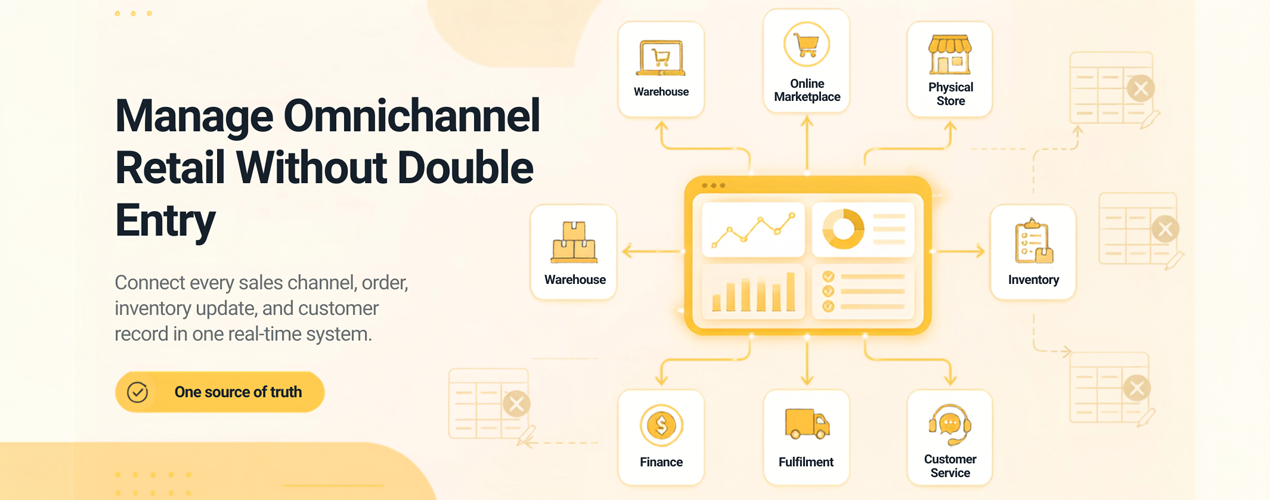
The answer is not better discipline. It is a single system of record, a single source of truth that every channel connects to.
Think of one authoritative database for orders, stock, and customers that every channel reads from and writes to. An order placed on Amazon appears in your order management software automatically. Stock is reduced once, a picking list appears in the warehouse, the invoice is created for finance, and the tracking number flows back to the customer. Nobody types anything twice; the platform moves the data.
That is retail order management done properly, and omnichannel order management extends it across every channel at once. It is also the architecture behind platforms such as Vision ERP from Sapio Systems, retail ERP software built around centralised inventory and stock synchronisation that prevents overselling. When stock sells in the shop, the website updates immediately. When a return lands, every system knows at once.
With automated order processing and inventory synchronised across sales channels, manual data entry drops to the exceptions that need a human. The difference from a patchwork setup is subtle to see but obvious to feel. Instead of reconciling systems, your team reconciles exceptions and acts on data that is right.
What to Look For in a Connected Retail Platform
Not every connected system delivers the same result. These are the details that separate an integrated retail ERP from a set of tools with loose links.
Real time synchronisation – Sync jobs that run every few hours leave a window where stock is wrong. Look for instant updates, not scheduled imports.
Native channel integrations – The platform should connect directly to where you sell. Connecting Amazon and your ecommerce inventory keeps both identical without a human in the middle, and the same applies when you connect eBay and warehouse inventory. Third party patches are points of failure.
Order orchestration – Orders should be routed by rules, not by hand. The system decides which warehouse fulfils each order, when stock is allocated, and how exceptions are flagged. Your team handles the exceptions.
One dataset for reporting – When finance, inventory, and sales reports come from the same data, nothing needs reconciling. Month end shifts from arguing about which figure is right to deciding what the numbers mean.
A provider who owns the outcome. Software is half of it. A partner who handles migration, trains your team, and stays available after go live removes most of the risk that keeps retailers stuck.
How to Move Without Disrupting the Business
Switching systems feels risky, and that feeling has a name. Status quo bias makes us overvalue the pain we know and undervalue the gain we have not experienced. Shrink the change.
Start with an audit. Map every place an order, stock movement, or customer detail is entered by hand. That list is your business case.
Then choose a platform that covers the channels you use today and the ones you plan next year. Buying for this year only is how fragmentation starts.
Migrate in stages. Bring your highest volume channel in first, prove the workflow, then add the rest. A migration checklist makes sure nothing gets missed. Train the team before you switch; learning a system while live orders flow is the fastest route to resistance. Measure what changes: hours saved on data entry, stock accuracy, reporting speed. Concrete numbers make the decision easy to defend.
Benefits of Removing Duplicate Data Entry
When the duplicate work disappears, the team that spent mornings rekeying orders can spend those hours on customer service and stock planning. The month end close stops being a reconciliation marathon. The warehouse stops guessing which number is right. Reporting shows today, not last week.
For a UK retailer this is also a competitive question. The businesses that respond to demand as it happens, never tell a customer an item is available when it is not, and answer enquiries from one complete view of the customer are the ones who keep the sale and the next one too.
If you want to see a single system of record in practice, book a demo with Sapio Systems. We will map your channels and show you how Vision ERP removes double entry, before you commit.